Atelier
Designing a floor plan app by talking to it.
TL;DR
Over a handful of evenings, I designed and shipped Atelier, a browser-based interior design tool with walls, rooms, a furniture library, a multi-mode measuring tool, undo/redo across every action, and a WCAG AA-compliant design system. I built it by collaborating with an AI tool as the medium.
I'm a designer. I don't write production code. This case study is about what it actually feels like to make software when the medium is conversation. The decisions that mattered, the moments I pushed back, and what the experiment taught me about being a senior designer in 2026.
The short version: the AI didn't design anything. I did. But I shipped considered, accessible, intentional software in evenings instead of months. That's the new thing.
Why this project exists
I was curious. Curious about what changes in the design process when the prototyping phase and the development phase collapse into the same conversation. Curious whether a designer who doesn't write production code could still ship something considered and accessible by treating an AI tool as a collaborator instead of a generator.
So I ran the experiment. This is what I found.
The starting point
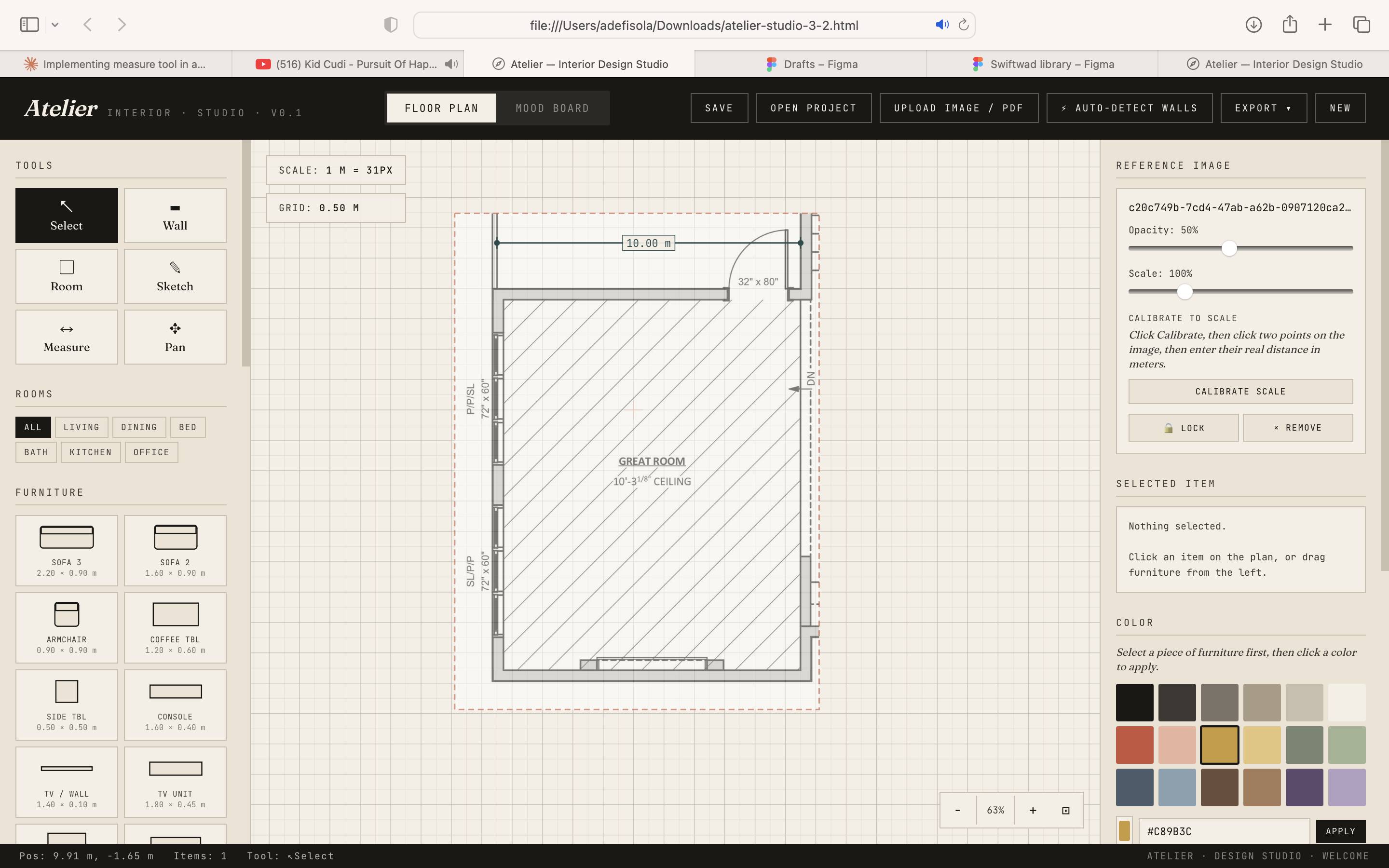
The file I started this round with was already a few thousand lines from an earlier experimental session. I copied it into a fresh chat and picked back up. It had a floor plan canvas, a furniture library, a sketching tool, and a visual identity I hadn't asked for. Warm paper background, Fraunces serif italic, uppercase mono labels. The AI's idea of "architect's atelier."
This turned out to be useful framing for the whole project. I didn't design the starting point. I had to decide, explicitly, what to keep and what to change. That's a designer's job whether the artifact is code or a wireframe.
The first lesson: false premises
I started with the smallest possible ask. Fix the measuring tool. I sent a confident spec describing all the scaffolding I thought I'd already added: measureMode, measurePts, a function called handleMeasureClick, a toolbar. I asked the AI tool to wire everything together.
It searched the file and told me that none of it existed. I'd uploaded the wrong version.
If it had nodded along, it would've written functions referencing things that weren't there. Instead, it pushed back before doing anything destructive.
This became the pattern. The AI challenging my premise when my premise was wrong. It was the single most useful thing about the collaboration. Good collaborators don't agree with you. They check.
Building the measure tool
Once the premise was right, I asked for a full multi-mode measuring tool from scratch. Distance, path (running total), and area (with shoelace-formula calculation). I wanted it to feel real: perpendicular tick marks, per-segment labels, area at the polygon centroid, keyboard commits.
What I didn't expect was how much of my input was about semantic decisions, not visual ones. Not “put the button here” but:
- “When switching between path and area modes mid-measurement, should in-flight points persist or reset?” We chose reset.
- “Should the commit button appear only when the measurement is valid?” Yes. Path needs 2+ points, area needs 3+.
- “How should a selected measurement look different from an unselected one?” Soft orange halo under the line.
These are designer decisions that never get made when you hand someone a brief saying “build a measuring tool.” When you're the one specifying, you're forced to think them through. Specificity is the design work.
The pause moment
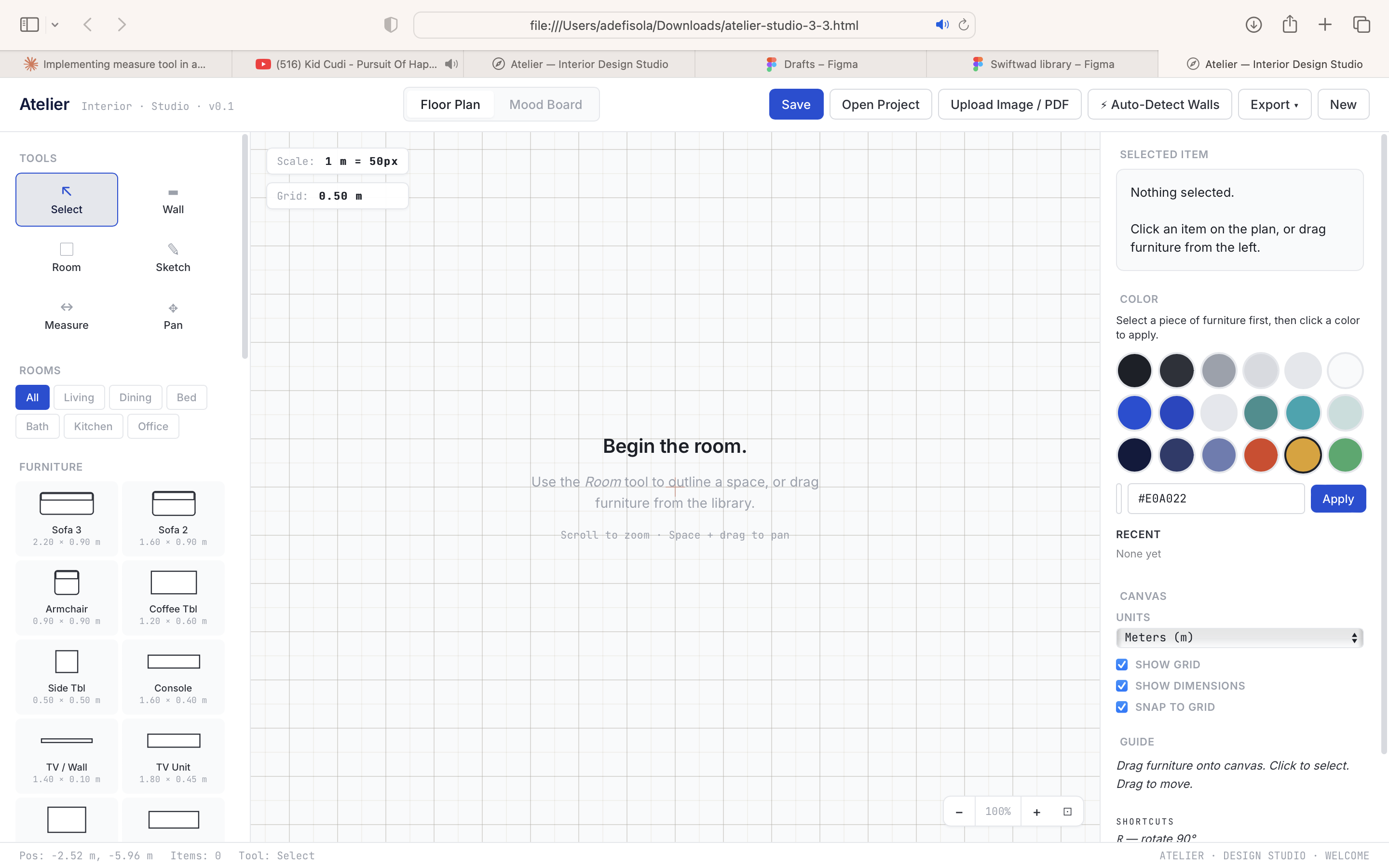
I asked next for a full overhaul of the auto-detect feature. A button meant to use AI vision to identify walls in uploaded floor plans. The AI tool immediately flagged the real problem: the existing fetch() couldn't work from a static HTML file. CORS would block it, there was no API key.
It laid out three architectural options, picked one, and started executing. Somewhere in the middle, I realized I wanted to stop.
I typed “Pause on auto detect lines.”
It stopped, audited the file, told me exactly which half-built pieces were sitting on disk (new buttons with no handlers, hidden modals), and asked whether to keep or revert. I chose revert. It undid everything cleanly.
This is the moment I keep thinking about. In traditional work, pausing mid-feature is expensive. You have to remember what you did, where you left off, what state the file is in. Here, exploring a direction and un-exploring it cost me nothing.
For designers used to “commit or don't commit,” that ability changes the economics of exploration.
Undo, and the right question at the right time
I asked for three features at once. Select-and-delete measurement lines, resize walls and rooms by entering numbers, and full undo/redo.
The AI tool led with a question I didn't expect: which undo architecture? Command pattern (cheap memory, invasive)? Or snapshot pattern (one piece of machinery, slightly heavier)? It argued for snapshots. I agreed.
Halfway through implementation, another question: what should Ctrl+Z undo? Destructive actions only? Everything? I picked everything.
This pattern of the AI asking the right question at the right moment was the most designer-feeling thing about the collaboration. Good design reviews work this way. The reviewer doesn't say “do X.” They say “have you thought about Y?”
The first implementation missed a few mutation sites (color picker, clear-all). I used the app, noticed undo skipping them, reported it, got fixes. That cycle of use, notice, report, fix is exactly how design QA feels with a human engineer, except faster.
The visual overhaul
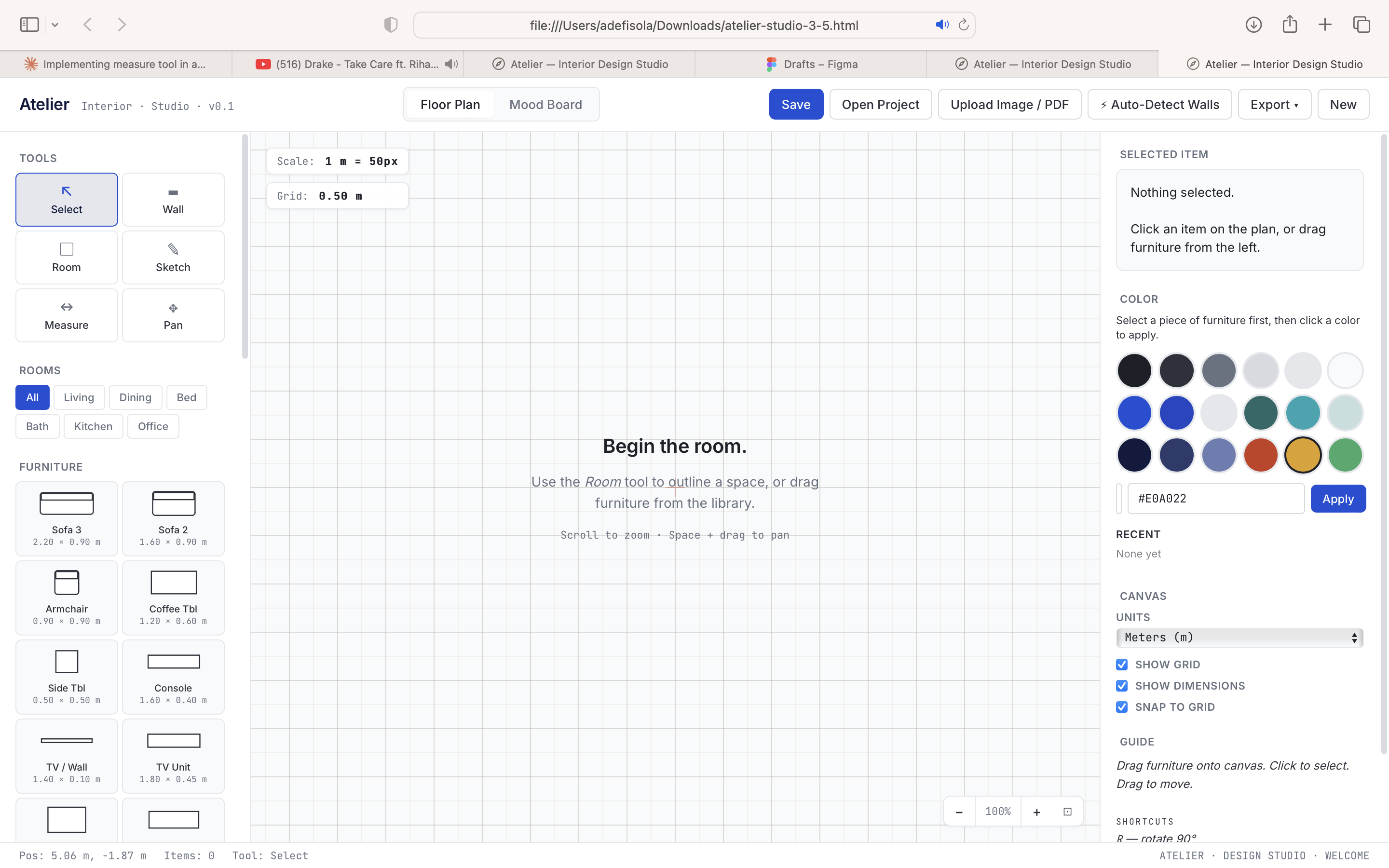
The biggest chunk came when I uploaded two images. A brand colour sheet with True Blue, Teal, Dark Blue, and semantic states. And a typeface reference showing Inter and SF Pro Display. I asked for a UI that was “modern and clean” with rounded edges.
The AI tool slowed me down. It identified that the current aesthetic (warm paper, Fraunces italic) was specific, and the reference images pointed to the opposite direction. It asked how far to go: full replacement, evolution, or minimal swap? It also offered to build a preview before committing.
I took the preview. The AI built a focused mock with header, sidebar, canvas, and inspector, so I could judge the direction before anything touched the real file. It flagged decisions it had made (canvas stays white vs. warm tint, measurement now teal, wordmark in Dark Blue) and asked which I wanted to keep.
This is when I understood what “AI-collaborative design” actually means. It's not the AI doing the design. It's me, making hundreds of tiny judgment calls, but with the ability to see results instantly and redirect without cost. The preview wasn't a mockup I asked for. It was the AI offering to de-risk the commitment. That's the judgement of a collaborator, not a tool.
I approved. The conversion touched 124 CSS variable references, 107 hex colours, and 100 font declarations, done in stages with checkpoints. No regressions.
Accessibility
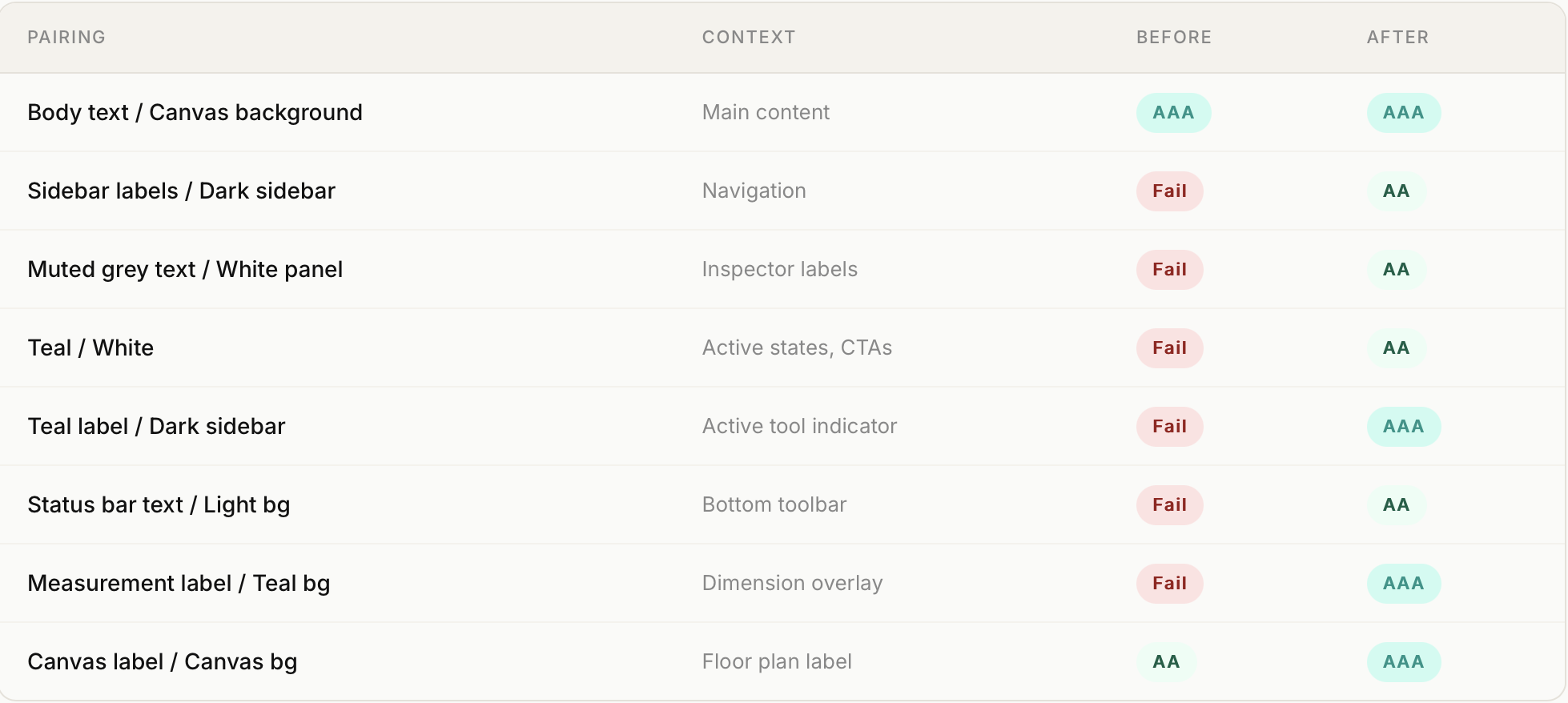
I asked the AI tool to audit the new design for WCAG contrast compliance. It wrote a script, found seven failures, explained which were most visible (the muted grey used everywhere for sidebar labels), and proposed minimum-drift fixes that would hit AA without changing the palette's character.
All 14 text/background pairings now pass AA. Eight pass AAA.
This is the step I would definitely have skipped if I was coding this myself. It took two turns.
What I learned
Specificity is the design work. When I couldn't describe what I wanted, I didn't get it. “Make the buttons pretty” got me generic SaaS. “Hairline border by default, darken to the muted-ink token on hover, keep the active state's blue border” got exactly what I wanted. The precision required is exactly the precision a good design spec demands.
Honest pushback was worth more than help. The moments I remember most are when the AI disagreed with my premise. The “none of that is in the file” moment. The “that API call can't work in a browser” moment. The “this aesthetic is specific and intentional, are you sure?” moment before the redesign. A collaborator who surfaces the right question is more valuable than one who executes the wrong answer well.
Preview-before-commit is underrated. Being able to see a focused mock before committing a migration meant I could change direction cheaply. The cost of exploring a design direction approached zero.
Saying “stop” is a skill. The AI tool often offered to do more than I asked. Scope creep is easier than ever when adding features costs almost nothing. “Leave it as it is, let me check the app out” was one of the most important things I typed.
What it didn't do
The AI didn't design anything I didn't describe. Vague asks got me competent but generic output. The palette came from brand references I uploaded. The typography decisions came from me. The measurement tool's three modes came from me. The undo semantics came from a question I answered.
What the AI did, constantly, was execute. Faster than I could have. With suggestions that improved my plans. With the patience to pause and revert without complaint.
That's the collaboration. I'm still the designer. The medium changed.
The thing I can do now that I couldn't do six months ago is ship.